Automate clicks with workflows for Mac
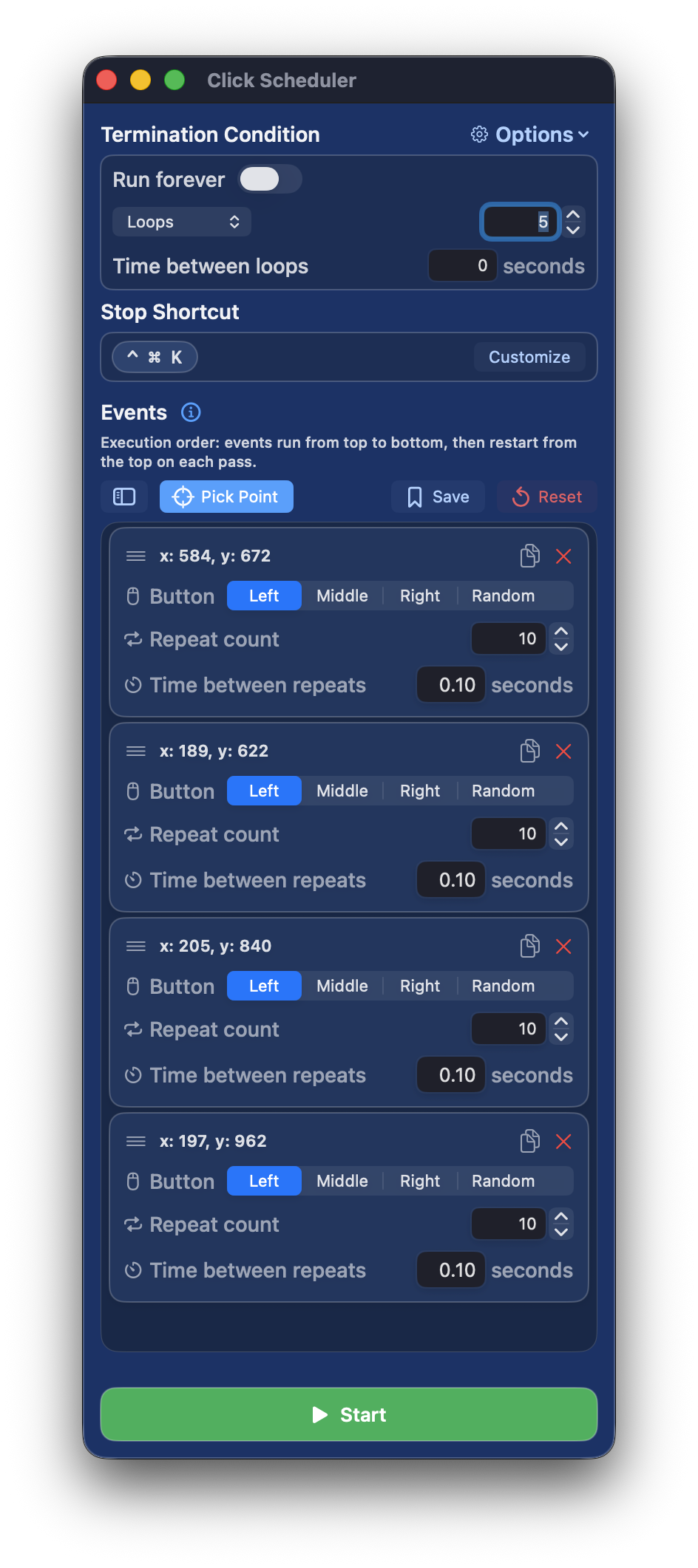
Click Scheduler helps you automate repetitive mouse actions on macOS with precise timing and full control over every step.
Build multi-step click workflows in seconds: pick points directly on screen, fine-tune coordinates, choose left/right/middle/random click behavior, and
set repeat counts plus delay per event. Organize your sequence with drag-and-drop reordering, quick duplicate, and delete controls.
Major Features
- Capture click points on screen with a live picker overlay
- Edit exact X/Y coordinates for precision
- Per-event mouse button selection: Left, Right, Middle, or Random
- Per-event repeat count and interval timing controls
- Run modes: Run Forever, Loop Count, or Total Time
- Optional delay between loops
- Global stop hotkey with custom shortcut support
- Save full setups to History (events + run settings), then load, rename, or delete anytime
- Free Plan supports 1 event
- Weekly and Monthly non-renewing subscriptions unlock unlimited events
- In-app restore purchases support
Clean, fast, and built for reliability, Click Scheduler makes repetitive clicking effortless.
Requires macOS 14.6+ and Accessibility permission to perform automated clicks.
If you need any assistance, our team is here to help. Please contact us.

